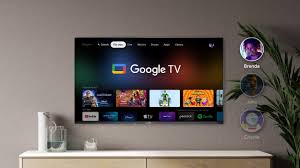

The living room television has quietly transformed from a passive screen into a responsive hub that anticipates preferences, manages connected devices, and even generates original media. Google TV sits at the center of that shift. Rather than forcing viewers to open one app after another, the platform gathers titles from dozens of services onto a single, personalized surface and layers intelligent assistance on top. What emerges is less a traditional smart TV operating system and more an evolving environment that treats entertainment, memory, and home control as connected experiences.
A Content-First Landscape That Reduces Decision Fatigue
Google TV begins with a deliberate redesign of how people discover something to watch. The home screen prioritizes titles over app icons. Recommendations drawn from Netflix, Disney+, YouTube, Prime Video, and many other services appear in rows tailored to individual viewing history and stated interests. A single watchlist travels with the account, so a show saved on a phone can surface immediately on the big screen. Profiles keep recommendations distinct for each household member, and dedicated kids’ spaces add time limits and content filters without requiring constant parental oversight.
This approach matters because the modern streaming library has grown too large for casual browsing. By surfacing relevant options across platforms instead of inside them, Google TV shortens the time between settling on the couch and pressing play. Live content receives similar treatment. A unified guide pulls together free channels from multiple sources alongside paid live services, creating a single place to scan what is airing right now. The result feels closer to a curated magazine than a directory of applications.
Gemini Turns the Screen Into a Conversational Partner
The most noticeable recent evolution arrives through Gemini. On compatible devices the assistant moves beyond simple voice search. Viewers can describe a mood, combine two people’s tastes, or ask for a recap of last season’s finale and receive visually rich answers that include images, short video clips, and live scorecards when relevant. Follow-up questions keep the conversation going without forcing anyone to reach for a phone.
Certain capabilities push further. Deep dives present narrated, interactive explorations of topics ranging from science to culture, designed for shared viewing. Sports briefs deliver concise, timed updates so fans can catch highlights without interrupting an evening. Settings themselves become adjustable through ordinary speech: a request that dialogue is hard to hear or that the picture looks too dim prompts automatic adjustments while the program continues. These interactions reduce friction that once required digging through nested menus.
Creative tools expand the same intelligence into personal media. Gemini can search a linked Google Photos library by description, surface specific moments, and apply artistic styles or transform stills into short clips. On select hardware the generative models allow entirely new images or short videos to be created from spoken prompts, turning the television into a collaborative canvas rather than a pure consumption device. The experience remains rooted in the living room, encouraging family members to experiment together rather than isolating the activity on individual phones.
Seamless Casting and Ecosystem Continuity
Google Cast remains woven into the platform, allowing content started on a phone, tablet, or laptop to move effortlessly to the larger display. Playback controls travel with the session, and the same account keeps progress synchronized. This continuity extends beyond entertainment. Because the television shares the Google account used elsewhere, calendars, photos, and search history can inform recommendations without additional setup. The mobile remote app further ensures that a misplaced physical remote never ends an evening; any nearby phone becomes a capable controller within moments.
The platform’s foundation on Android means access to the full Play Store catalog of television-optimized applications. Thousands of titles cover streaming, gaming, music, and niche interests, with regular updates that keep the experience current. Hardware partners such as Sony, TCL, and Hisense integrate the software at different performance levels, while Google’s own Streamer device offers a consistent reference point that also serves as a smart-home anchor.
The Television as Smart-Home Command Center
Beyond media, Google TV increasingly functions as a central panel for the connected home. A dedicated Google Home view surfaces lights, thermostats, cameras, and locks. Doorbell notifications can expand to full-screen camera feeds, and voice commands issued through the remote or Gemini control compatible devices without switching contexts. On the Google TV Streamer, Matter controller and Thread border router capabilities turn the device into a low-cost hub that strengthens mesh networks for sensors and other accessories. Recent updates improved Thread credential sharing, simplifying the addition of new devices.
This dual role—entertainment surface and household dashboard—reflects a broader trend. Screens that once only displayed content now mediate the physical environment around them. The advantage lies in reducing the number of separate apps and interfaces a household must master. When the same remote and voice system that starts a movie can also adjust the lights or check the front door, the television becomes a more natural center of daily life.
Personalization That Respects Shared Spaces
One quiet strength of the platform is its handling of multiple users under one roof. Separate profiles preserve distinct recommendation engines and watch histories while still allowing easy switching. Kids’ profiles enforce boundaries without constant negotiation. Screensaver options further personalize the idle screen, whether through AI-generated imagery described by voice or a rotating selection of family photos. These touches acknowledge that a television is rarely a single-person device; it must serve overlapping preferences and ages without constant reconfiguration.
The same intelligence that suggests the next show can also surface relevant free content or highlight titles already included in existing subscriptions, helping households extract more value from what they already pay for. Over time the system learns not only individual tastes but patterns of shared viewing, refining suggestions for couples or families who watch together.
Looking Toward a More Adaptive Living Room
Google TV illustrates how the traditional boundaries around television continue to dissolve. Content discovery no longer requires opening every service in turn. Assistance arrives as conversation rather than button presses. Personal memories and generated media share space with professional programming. Connected devices become controllable from the same surface that plays the evening’s movie. Each of these capabilities builds on the others, creating an environment that feels increasingly responsive to the people using it.
The platform’s real contribution is not any single feature but the way those features reinforce one another. A recommendation engine that already understands viewing habits becomes more useful when it can also answer follow-up questions. A smart-home panel gains relevance when the same voice that dims the lights can start a slideshow of recent vacation photos. As generative tools mature and more devices gain Gemini support, the television is positioned to move further from passive display toward active participant in both entertainment and household management. For households already invested in the broader Google ecosystem, the transition feels less like adopting a new product and more like extending familiar capabilities onto the largest screen in the home.